Every quote promises something. A binding estimate promises a price. A non-binding estimate promises a best guess. Reps who blur the two create disputes at delivery, so it is worth being precise about which one you are selling and writing it down every time.
Binding estimate
A binding estimate is a fixed price for a defined list of items and services. If the shipment turns out a little bigger or smaller than expected, the price does not change, as long as the customer does not add items or services.
Good for: customers who want certainty, jobs with a clear inventory, and sales conversations where a firm number helps you close.
Watch out for: an inventory that changes between the estimate and move day. If the customer adds items, you need a clear, agreed way to revise the price.
Non-binding estimate
A non-binding estimate is your best estimate of the final cost. The final price depends on what is actually moved.
Good for: jobs where the inventory is uncertain, or customers who prefer to pay for what actually goes on the truck.
Watch out for: customers who treat the estimate as the final price. Say out loud that the final number can be higher or lower than the estimate. The rules for non-binding estimates differ by type of move and by state, so check the requirements that apply to your company and write your customer wording to match them.
How to choose
- Is the inventory firm? Lean binding.
- Is the inventory likely to change? Lean non-binding, or use a binding estimate with a clear change process.
- Does the customer need a firm number to say yes? A binding estimate closes more easily.
- Can your operation absorb an inaccurate count? If not, a non-binding estimate protects you.
What to write down
Whichever type you use, record it the same way every time: the estimate type, the cubic feet, the rate and the pickup date in the job remarks. When a dispute comes up months later, a one-line note is the difference between a quick answer and a long argument.
Setting it in Granot
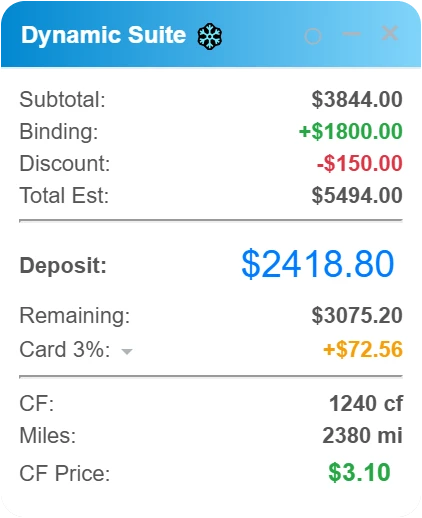
The Granot charges page has a binding type field and an amount line for the binding fee. In Dynamic Suite PRO, one switch adds the binding fee line when you click CF Price and another sets the binding type, and the quote summary goes into the remarks in the same step. A newer rep who is not yet sure how to set the binding fee does not have to guess: the calculator sets it for them, the same way every time. Whether and how you use the binding fee is your company's policy.
Keep learning Granot
To see where the estimate type shows up on screen, read how to read the Granot charges screen and the Granot training guide.
More on Granot: Granot CRM for moving companies, Granot alternatives and add-ons and Granot moving software reviews.
Frequently asked questions
Is the binding fee required?
No. It is an optional line. Use it according to your company's policy.
Can a binding estimate change?
If the customer adds items or services, yes. Agree how changes are handled before move day.
Which is better for the customer?
Binding is better for certainty. Non-binding can suit jobs where the inventory is uncertain. Neither is better in every case.
Can I switch an estimate from non-binding to binding?
Usually before the move, with the customer's agreement and an updated estimate. Document it.
Set the estimate type once, correctly
Dynamic Suite PRO sets the binding type and writes the quote summary for you on every job.
Install free on Chrome