The deposit is the first real commitment between you and a customer. Handle it casually and you get missed steps, confused customers and jobs that do not lock the way you expected. Handle it the same way every time and it becomes a five-second routine.
Step 1: Start from the live subtotal
Use the subtotal on the charges page, not the number you remember from the quote. The live subtotal already reflects the job as it stands right now, including any add-ons and discounts. A rep who works from memory or from an old quote will eventually use a number that is out of date.
Step 2: Use the same rule on every job
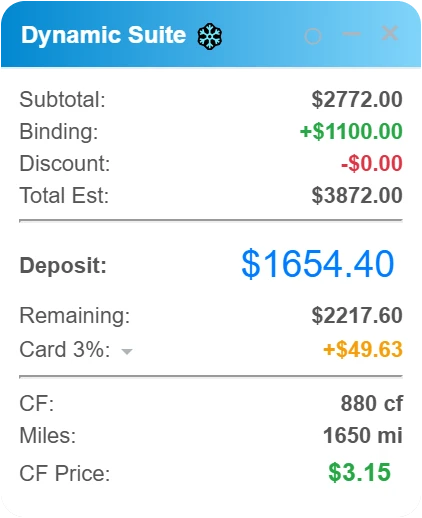
Every company has its own deposit policy. What matters is that every rep applies it the same way, so two customers with similar jobs are not treated differently. If your team calculates by hand, write the rule down where everyone can see it. If a tool calculates it, check the first few results against your policy before you rely on it.
Dynamic Suite PRO reads the live subtotal and works the deposit out for you, so the number does not depend on who is on the phone.
Step 3: Tell the customer what a card payment costs
If customers can pay the deposit by card, there is a card processing fee to account for. Tell them the exact figure before they pay, not after. Dynamic Suite PRO shows the card fee next to the deposit so the rep can say it out loud and it does not get forgotten. It avoids the awkward surprise later and gives the customer the choice to pay another way.
Step 4: State the balance clearly
Say both numbers in the same breath: the deposit today and the balance on delivery. Customers remember the number they hear last, and a clear balance means fewer questions at delivery.
Step 5: Do not forget the deposit checkbox
On the Granot payment screen there is a deposit checkbox. If it is not ticked, the deposit does not reserve the job the way you expect, and the problem shows up later when someone looks at it. It is the most common small mistake in the deposit step.
Where the time really goes
The deposit itself is quick. The slow part is the round trip: finish the price, open the payments tab, type the amount, tick the deposit box, submit and return to the charges page. Done by hand that is one to two minutes on every job. With Dynamic Suite PRO the deposit row on the calculator does the whole sequence with one click, in a few seconds.
A simple deposit checklist
- Deposit taken from the live subtotal
- The same rule on every job
- Card fee quoted when the customer pays by card
- Balance stated out loud
- Deposit checkbox ticked
Keep learning Granot
Learning the whole flow? The Granot training guide covers it from the first call to the signed estimate.
More on Granot: Granot CRM for moving companies, Granot alternatives and add-ons and Granot moving software reviews.
Frequently asked questions
How much should the deposit be?
That is your company's policy. What matters is that it is the same on every comparable job.
Should the deposit reflect add-ons?
Work from the live subtotal on the charges page. It shows the job as it stands now.
Who pays the card fee?
That is your policy. The calculator shows the figure so reps can be upfront with the customer.
What happens if reserve is not ticked?
The deposit may not apply to the job the way you intended. Make it part of the routine.
One click for the whole deposit
Dynamic Suite PRO reads the subtotal, calculates the deposit and fills the payment for you.
Install free on Chrome